
Getting started
Install
Download the DMG, drag Something to Applications, open it. The first launch asks macOS to confirm; it is signed and notarised. It needs an Apple silicon Mac.
Connect GitHub
Pull requests are sent from your Mac under your own GitHub login. The first time you import a project from GitHub or send a change, the app asks you to connect GitHub: it opens GitHub in your browser, you approve, and that is the last time it asks. No Terminal. Something never asks you for a password or a token; the sign-in lives in your Mac's keychain.
An account with us is only needed for a paid plan or the trial.
Open a project
File › Open Project, or Import from GitHub. The app works out the start command, source folder, token files, rules file and the scripts that must pass, installs packages and starts the product, ticking off each step. The product then opens as a draft: Save if it looks right, Adjust to tell it what it missed, Discard to throw it away.
The plan is saved as .something/project.json in the project. Commit it so your team inherits it. Change it later in Project Settings.
Pick an engine
Settings › AI. If claude, codex or gemini is on your PATH and signed in, it is listed and needs no key. Otherwise add a key for Anthropic, OpenAI or Google, or an HTTP endpoint of your own.
Make a change
⌘I turns on Select. Click an element. Edit in the panel, or ask in Chat. Apply to sets the reach. ⌘Z undoes. The Changes tab lists what you did.
Your first change
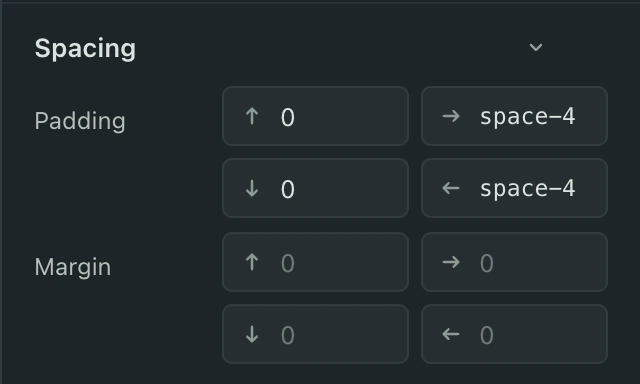
Open a page in your product that has a button. Press ⌘I, click the button, and change its padding by one step in the panel. Then Send for Review. Your first pull request is a one-line diff, and a developer can review it in a minute.
Send it
Send for Review in the Changes tab. Read the title and summary, add a note if the diff cannot say it, Send. If GitHub is not connected yet, the app asks now. The pull request number appears; Open shows it on GitHub.
Linked repositories
Project Settings › Linked repositories › Add Folder or Add from GitHub. Components the product installs from that repository are then edited at their source.
Shortcuts
- ⌘O
- Open Project
- ⇧⌘O
- Import from GitHub
- ⌘I
- Select
- ⌘K
- Search pages, words, layers, tokens and commands
- ⌘J
- Chat
- ⌘N
- New Chat
- ⌘Z
- Undo
- ⇧⌘Z
- Redo
- ⇧⌘Y
- Changes
- ⌥⌘Y
- History
- ⇧⌘C
- Comment
- ⇧⌘R
- Checks
- ⌥⌘E
- Component Editor
- ⌘,
- Settings
- Esc
- Deselect the canvas
Known limits
Edits what exists; does not create screens. Precise selection needs React. Apple siliconMacs. Pull requests on GitHub. Bring your own AI.
Uninstall
Drag the app to the Bin. Project plans stay in each project's .something folder; the app's own data is in ~/.something.